
Image to Prompt — Free Scene Prompts, No Login
Image to Prompt on ThumbBlox turns a photo into an editable scene prompt for free, with the image processed on your device.
ThumbBlox is a free image to prompt tool for creators starting with a photo, screenshot or scene reference. A local AI drafts a basic subject description; image shape, sampled colors and your optional notes help build the editable English prompt. Copying and text downloads cost $0, need no account and add no watermark. It accepts one JPG, PNG or WebP up to 10MB and 20 megapixels.
How image to prompt works
Choose one image and let the browser analyze it locally. The first run needs an AI model download; later runs may reuse the browser cache. Pick a scene description, natural language, Stable Diffusion tags or Midjourney format. Review the draft before copying it, because a small local model can miss details or describe a subject incorrectly.
- Choose a JPG, PNG or WebP from your device; the picture is not uploaded.
- Pick the prompt format and length, then add any important visible details.
- Generate the prompt and keep the page open while local analysis runs.
- Edit any errors, then copy the prompt or download the plain-text file.
Image to prompt examples
A useful scene prompt names the main subject, its surroundings and the visual details you want to keep. These image-and-text examples show how a reference can become an editable creative brief. Treat a prompt as a starting point: keep the parts you can verify in the picture and replace the subject or setting when planning a new image.
Reference image
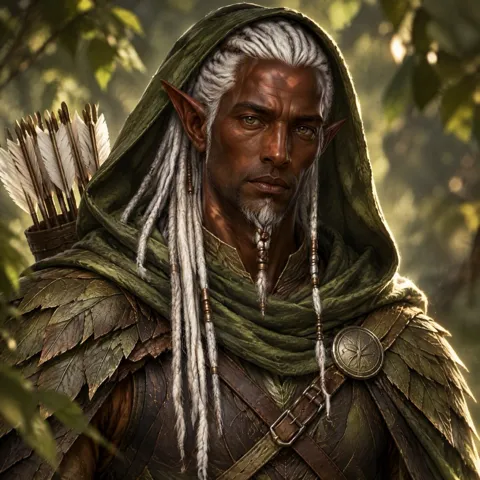
Example prompt
A silver-haired fantasy ranger in a dark green hood, shown from the chest up with a quiver over one shoulder, against a softly blurred forest. Square portrait composition, green and brown palette. Adjust the character details before generating a variation.
Reference image
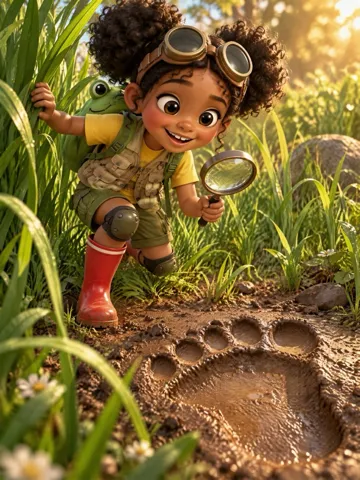
Example prompt
A stylized child explorer wearing goggles and red boots crouches beside an oversized animal footprint in a forest path, holding a magnifying glass. Tall composition with plants in the foreground and warm sunlight in the background.
Reference image
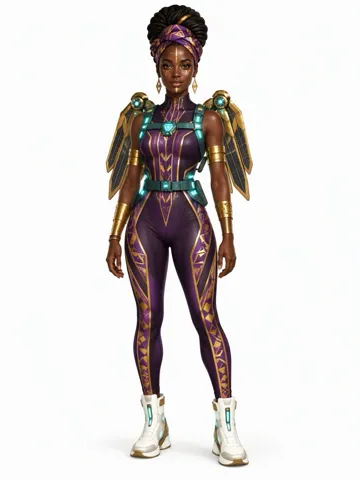
Example prompt
A full-body futuristic heroine in a purple and metallic gold suit, standing on a clean white background. Tall character-sheet composition, teal belt accents and pale boots. Keep the silhouette clear and leave space around the figure.
Is image to prompt free without login?
Yes. This image to prompt tool is free without login: analyze one image, edit the text and download a prompt without credits, a subscription or an added watermark. There is no daily server quota because analysis runs on your device. Your browser must download the AI model on first use, and device memory or connection speed can prevent a run from completing.
Can I turn an image into an AI scene prompt?
Yes. Choose Scene description to turn a picture into a basic AI scene prompt, then add the positions, lighting or background details the local model missed. It is an image to prompt AI scene generator for text, rather than a scene image or video generator. A still image cannot show a real camera movement; add any intended movement yourself when adapting the prompt for video.
Prompt formats for your next image
The same scene can be written as natural language, a compact tag list or a Midjourney prompt with the measured image ratio. Nano Banana and GPT Image use the natural-language option; Stable Diffusion uses tags. These formats reshape the draft rather than call those models. To create a picture, copy the edited text into the image generator you use and review its own prices and settings.
YouTube thumbnail generatorImage to prompt pricing & credits
Every text action on this page costs $0 and uses 0 credits: local analysis, changing the prompt format, editing, copying and downloading. No login is needed, and the tool adds no watermark to the text. One image is processed at a time. Separate image generation tools have their own prices and do not run when you generate a prompt here.
| Action | Price | Credits | Added watermark |
|---|---|---|---|
| Analyze one image | $0 | 0 | None |
| Edit, change format and copy | $0 | 0 | None |
| Download the full .txt prompt | $0 | 0 | None |
What this image to prompt generator cannot do
This tool cannot recover an original prompt, seed, camera lens or exact face identity from pixels. Its small local AI can miss objects, text, game characters and lighting; sampled colors describe the whole picture, not individual objects. It does not create images or videos, analyze video clips, process batches or promise a matching recreation. Large files and older mobile browsers may exceed available memory even within the file limit.
Image to prompt FAQ
This tool produces an editable English text prompt from one still image, with no account or app installation. The picture stays in your browser during analysis. Use a clear reference you have permission to use, check the description against it and keep a copy of the text if you want to continue working after closing the page.
What image formats can I use?
Use a static JPG, PNG or WebP up to 10MB and 20 megapixels. GIF, SVG, HEIC, video files and image links are not accepted. Convert an unsupported file to JPG or PNG first.
Are my reference pictures stored or sent to an AI provider?
No. The selected picture is read and analyzed on your device. The browser downloads model files, but does not send your picture to a server or store it in a gallery. Closing or refreshing the page clears the selected picture and prompt.
Can I use image to prompt on my phone?
You can select a picture in a current mobile browser without installing an app. The model download and local analysis need substantial memory, so an older phone may fail or be slow. Try a smaller picture or a current desktop browser if that happens.
Can I use the prompt for commercial projects?
The text tool adds no commercial-use restriction, but extracting a description does not grant rights to someone else’s picture, character or trademark. Use references you have permission to use and check the rules of your chosen image generator.